
The quietest heist in the gold market.
Automated gold and index trading. A rules-based bot for gold breakouts and stock-index pullbacks. Review the results — including losses — and test it before you buy.
- No grid
- No martingale
- A stop loss on every trade
Trading involves risk. Past performance does not guarantee future results.
Tracked results, losses included
One trading account running Giza Gold EA (Aggressive preset), read from the trading terminal every 5 minutes.
Loading results…
Open trades now: —
- Tracked since
- —
- Preset
- Aggressive
- Last data update
- —
Net return chains the result of every closed trade; deposits and withdrawals never count as profit. A few weeks of results say little about the long run.
Get the weekly heist report.
Once a week: every trade Giza closed, the wins and the losses — in your inbox. Unsubscribe in one click.
Rather get each trade as it happens? Follow on Telegram
How Giza trades
Two rule-based strategies on one chart, each with its own stop loss. All rules, presets and backtests.
Gold breakout
Follows gold's trends
- Waits for gold (XAUUSD) to break out of its recent range, only in the direction of the bigger trend.
- A stop loss from the first second that trails behind the best price. No fixed take profit.
- Pending orders are removed on Friday evening, so nothing fills on a Monday gap.
Index pullback
Buys short dips in an uptrend
- S&P 500, Nasdaq 100, Dow 30, Nikkei 225, long only, while each index is in a long-term uptrend.
- Buys after a short, sharp sell-off and sells once the index has bounced, or after a set number of days.
- A stop loss on every trade. About 3 trades a month, each held a few days.
Risk controls
Configured in the inputs
- A stop loss on every trade; the lot is sized from your risk %. Gaps and slippage can make a loss larger.
- Max-loss safety net (20% by default): at 80% of the limit it closes all trades and stops.
- Optional daily limit, prop firm presets and a high-impact news lock.
The software and setup
An Expert Advisor for the MetaTrader 5 desktop terminal. One chart runs everything.
- Buy or rent on MQL5. Log in to your MQL5 account in MetaTrader 5 (Tools → Options → Community).
- Install it from the Navigator: Market → Purchased → Install.
- Turn on Algo Trading and drag Giza onto any chart. It finds your broker's gold and index symbols by itself.
- Pick a preset on the Inputs tab (Load). The default settings are the Standard preset.
- Keep MetaTrader running. The EA only trades while the terminal is open; a VPS helps.
Price, what you get and how to test it
Checkout, licence and updates are handled by MQL5, the official MetaTrader store. Nothing is paid on this website.
Giza Gold EA for MetaTrader 5
$199USD, one-time purchase
Launch price for the first 10 copies, then $499
- Or rent: 1 month $49, 3 months $99, 6 months $149
- 10 activations (MQL5 licence: one activation per computer you install it on)
- 3 presets as set files: Standard (default), Aggressive, Low Drawdown, with loading instructions
- Built-in panel, prop firm presets, news lock and account guard
- Updates through MQL5 at no extra cost
- Needs MetaTrader 5 (desktop) and a broker with gold and stock-index CFDs
Opens the MQL5 product page, where you can buy, rent or download the free demo. Prices in USD as listed on MQL5.
Backtest in MT5
The free demo from MQL5 runs only in the MetaTrader 5 Strategy Tester, on historical prices: you can run any preset over any period, on your own broker's data. It cannot trade a demo or real account.
- On the MQL5 page click Free Demo; it installs into your MetaTrader 5
- Strategy Tester → Expert: Giza Gold EA; use “1 minute OHLC” or “Every tick based on real ticks”
Try on a demo account
A separate 14-day trial of the full EA that trades a demo account in real time, so you can watch it on your own charts. It does not run on real accounts and stops after 14 days.
- Download GizaGoldEA_Trial.ex5 from our trials post on MQL5
- Copy it to MQL5 → Experts (File → Open Data Folder), refresh the Navigator, drag it onto any chart
Common questions
Does it use a grid or martingale?
No. Every trade has its own stop loss and a lot sized from your risk %. It never adds to a losing trade.
What is the difference between the two tests?
The free demo from MQL5 runs only in the Strategy Tester on past prices. The 14-day trial trades a demo account in real time. Neither trades a real account; for that you need the purchased or rented EA.
Are the results on this site from the same bot?
Yes. The tracked account runs Giza Gold EA 1.10 with the Aggressive preset. Every trade is on the results page. Backtests are shown separately and never added to the tracked record.
How much can I lose?
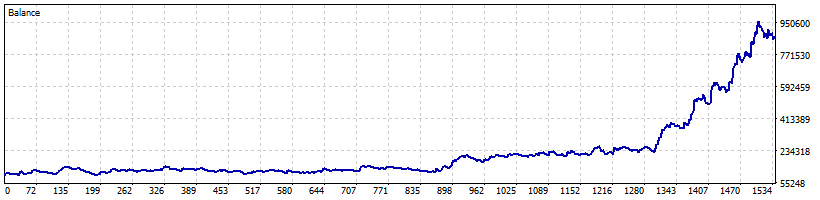
Each trade risks about the % you set (default 1%), but gaps and slippage can make a loss larger, and losses can come in a row. The safety net closes everything at 80% of its limit. In the backtest the Aggressive preset had a 35.2% equity drawdown, Standard 17.7% and Low Drawdown 12.0%. Only trade money you can afford to lose.
Can I use it on a prop firm challenge?
It has presets for FTMO, FundedNext and The5ers rules. Pick your firm in the inputs and keep the risk at 1% or lower, not the Aggressive preset. Check your firm's current rules yourself; the EA cannot guarantee you pass or keep an account.
What do I need?
The MetaTrader 5 desktop terminal (or a VPS running it), a broker with gold and stock-index CFDs, hedging or netting account. Low index spreads help. A small account may be below the smallest gold lot at normal risk.
How do updates and support work?
Updates are delivered through MQL5. For help, send a private message on MQL5 or email [email protected].
Inspect it. Test it. Then decide.
Giza Gold EA for MetaTrader 5. Every trade on the results page, two ways to test before you buy.